
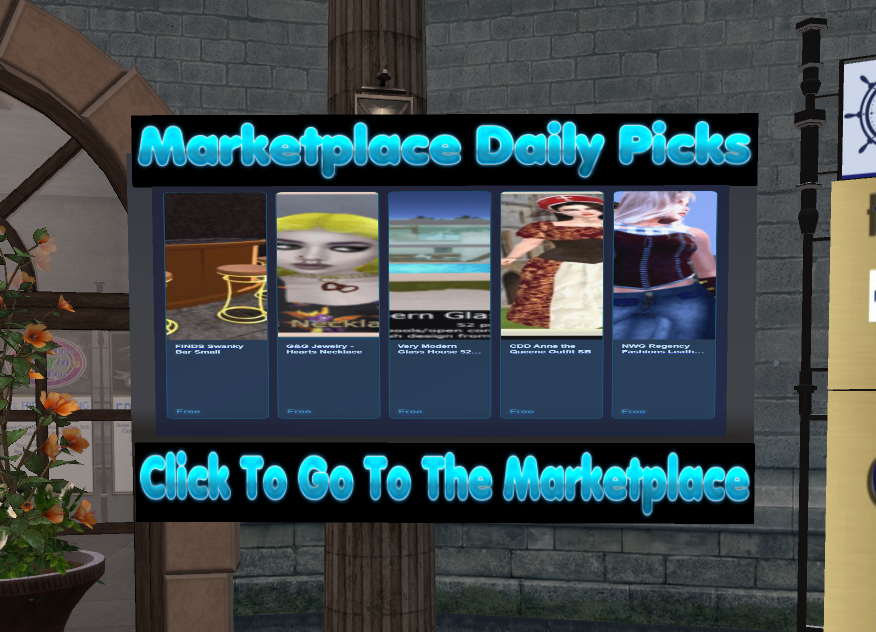
Description
*** Neverworld Grid – Marketplace Daily Picks – Set-Up to Display In-World ***
– This Display is already coded to receive the same Five Daily Picks that are displayed on Facebook.
– The URL is already set, just follow the simple instructions below to get it working!
– Enjoy your Daily Picks Displayed anywhere you want!!
— NOTE: This Board uses Media-On-A-Prim and will not work on the same parcel as other Media!! If you have other media on your parcel and wish to display
this board in addition to other media, you will need to create a parceled-off area separate for this board!
1. Unpack all contents of this box to your inventory.
2. Rezz the Display Board and position it where you want it to be!
3. Open your World> Parcel Details> Media tab and place the provided image in the square Media Texture.
4. Cut & Paste the URL from Chat that displayed when you rezzed the board, should be: https://neverworldgrid.com/neverworld-moap-display into the HomePage URL.
5. Once the Media URL and Media Texture is set, you should be good to go! Simply Click on your Media button at the top of your client (in Firestorm) the little camera.
6. You should now see the Five (5) Daily Picks! The board automatically refreshes every 3 hours, but the Daily Picks only Update every morning at 3 AM EST.
Enjoy Your Daily Marketplace Picks!!
Reviews
There are no reviews yet.